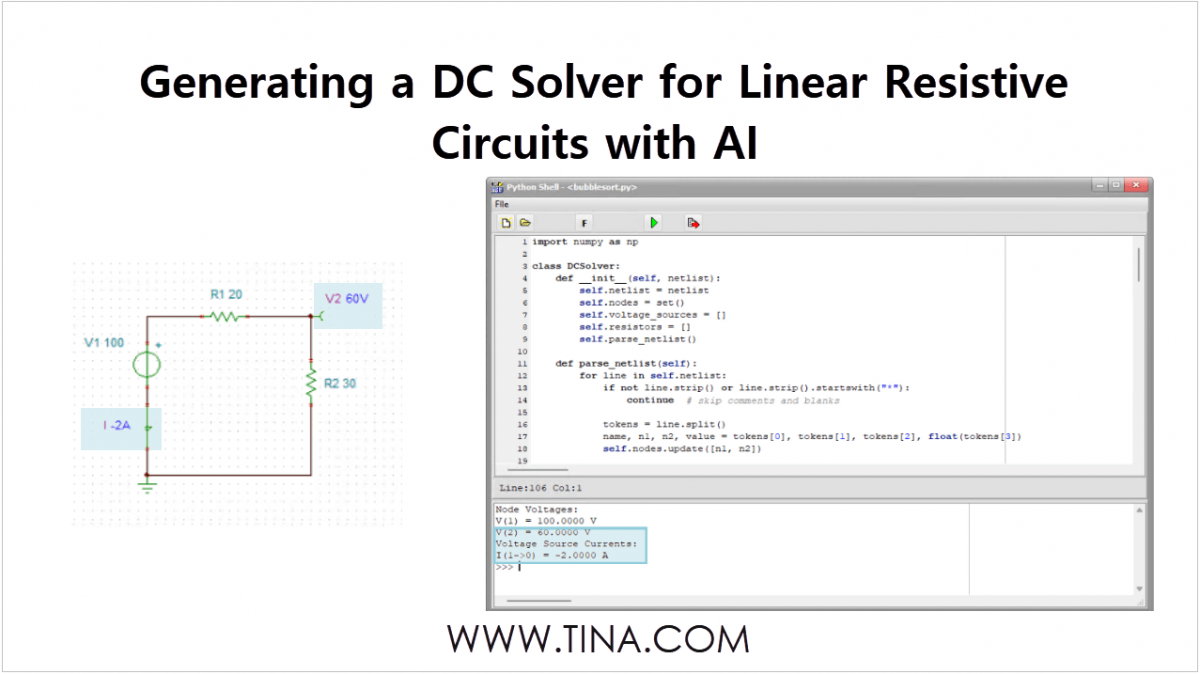
In our latest video, we demonstrate how to use the ChatGPT AI to generate a general Python program, which you can then run directly within the TINA simulation software. By studying the Python code, you can learn about the principles behind how TINA works for linear DC circuits.
Generating the Python Code with ChatGPT
Start chatgpt.com and enter the following request:
“Generate a DC solver from netlist using Python. Include one test example with a voltage source of VS=100V, R1=20, R2=30.”
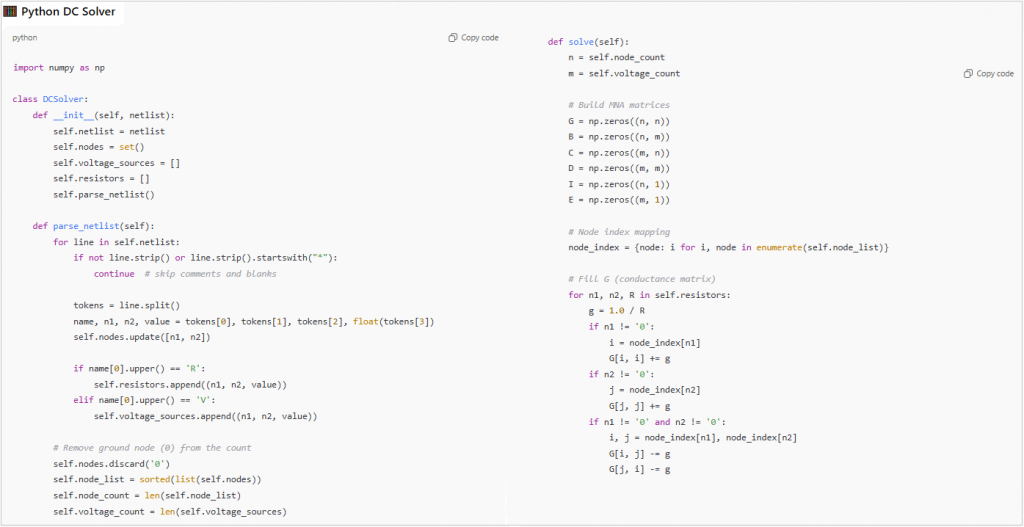
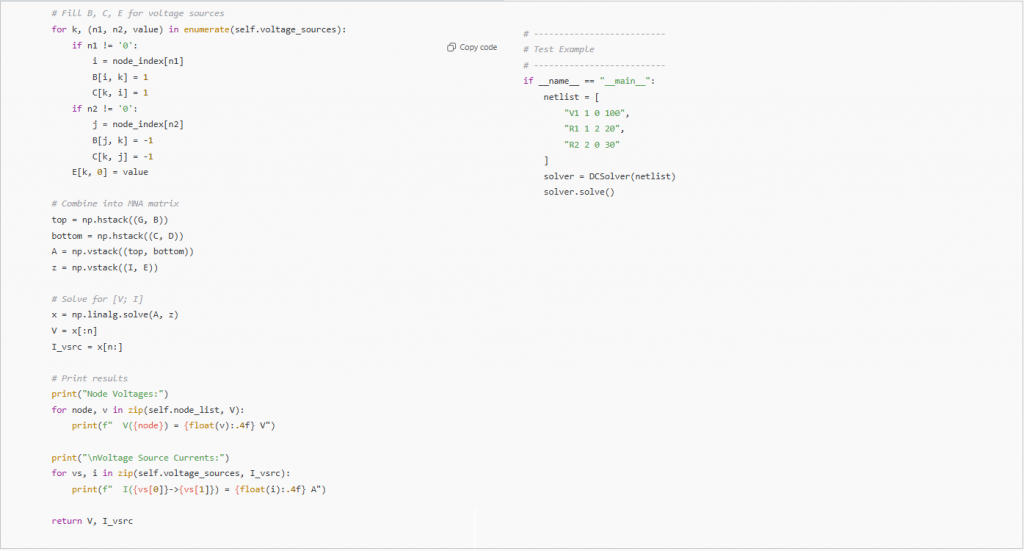
The AI will immediately respond with a structured explanation, followed by the generated Python code. The generated code is typically quite general, allowing you to solve any DC circuit using the specified netlist syntax.
The generated Python code by chatGPT
Important Note: Keep in mind that ChatGPT and most other AI systems may generate slightly different Python code or result formats each time they are used.
Integration into the TINA Environment
Once the code is generated, we need to import it into the TINA simulation software for execution.
Running the Code
Use the “Copy code” icon to copy the generated Python code to your clipboard.
Start TINA.
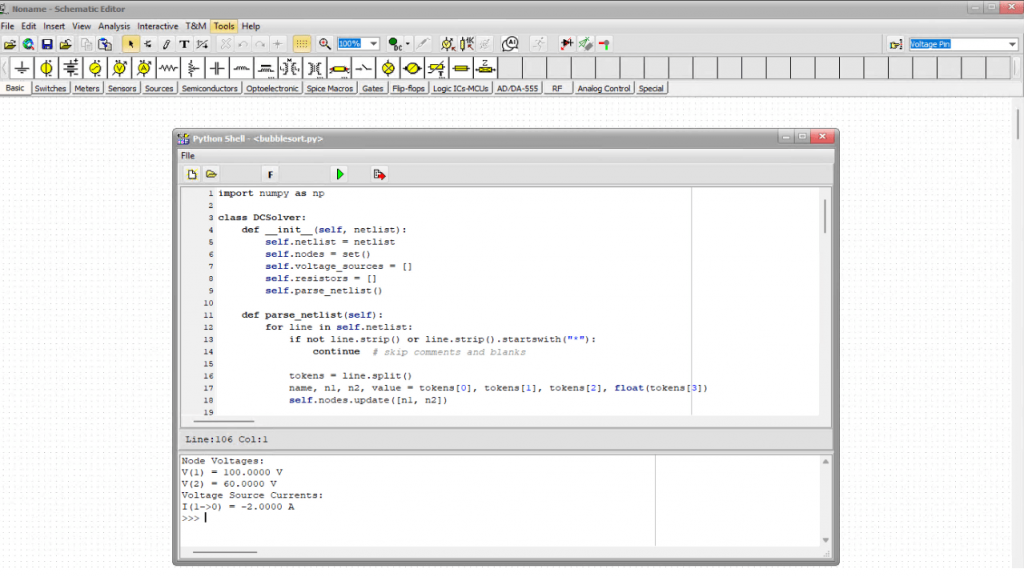
Open the built-in Python compiler: Select Python Shell from the Tools menu.
Paste the Python code into the compiler’s editing area.
Press the “Run” icon.
The Python program will execute and display the nodal voltages, including the source current.
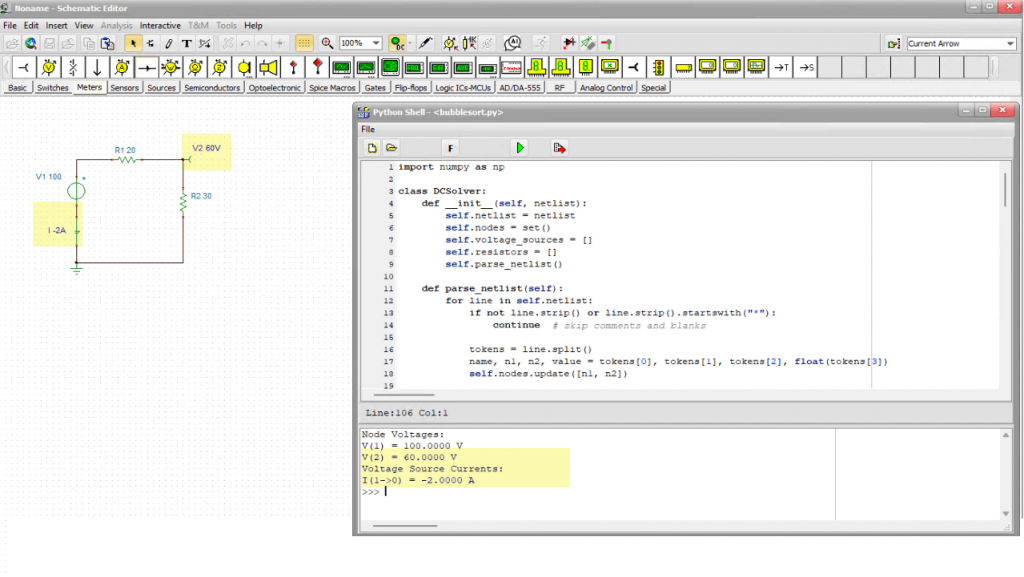
Inserting the Python code into TINA’s Python Shell
Comparison with TINA Simulation
To check the validity and accuracy, draw the circuit using the Schematic Editor of TINA and run a DC analysis. Enter the schematic equivalent of the example circuit, then press the DC button.
Results Match
The values calculated by TINA (V2 = 60 V and I= -2A) match exactly the results obtained from the AI-generated Python program.
The calculated values from TINA match the result obtained from our Python program
By studying the Python code, you can learn about the principles behind how TINA works for linear DC circuits.
TINA 15 and all future versions are designed for true cross-platform compatibility, running effortlessly on Windows, Linux, and macOS. On Linux and macOS, TINA uses Wine to execute the Windows version directly, delivering virtually the same performance as on native Windows systems.
This unified approach ensures that exactly the same TINA program operates across every supported platform — guaranteeing identical features, results, and user experience everywhere.
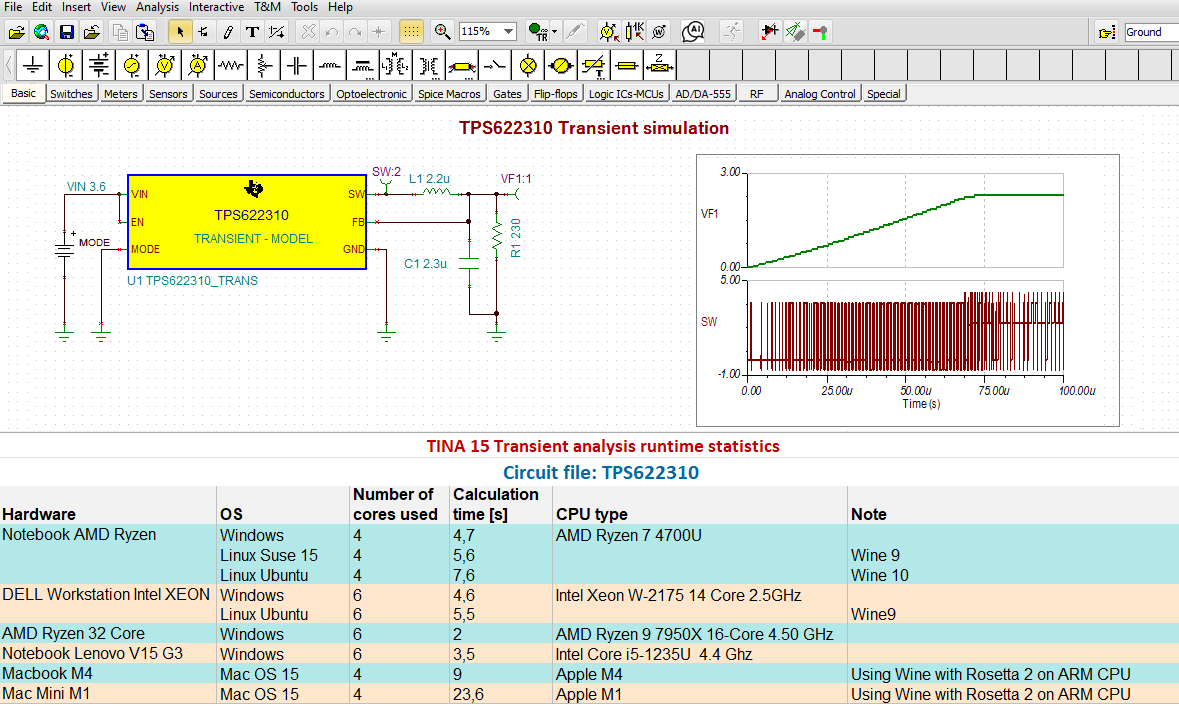
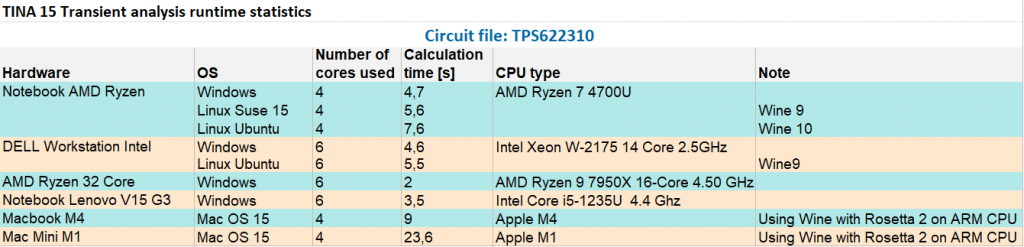
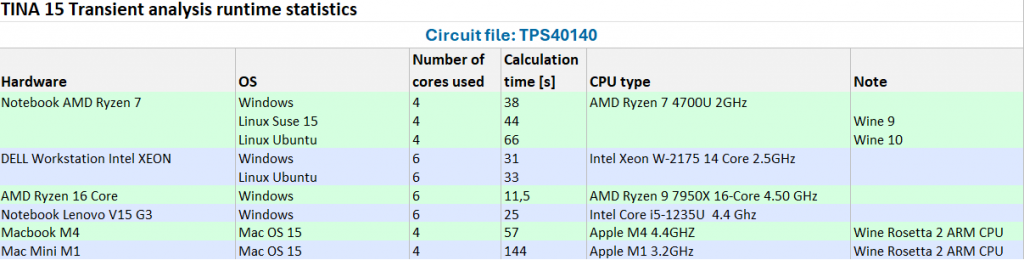
Below you can find benchmark measurements comparing the analysis of two circuits on different computers and operating systems.
TPS622310 Ultra Small Step Down Converter
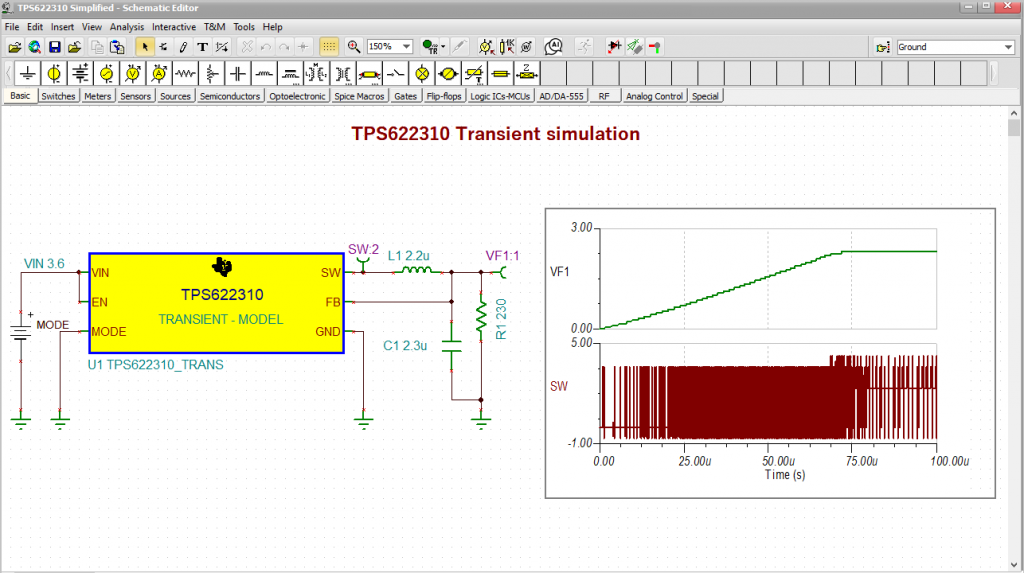
TPS622310 Transient analysis
TPS622310 circuit: TINA v15 Transient Analysis runtime statistics
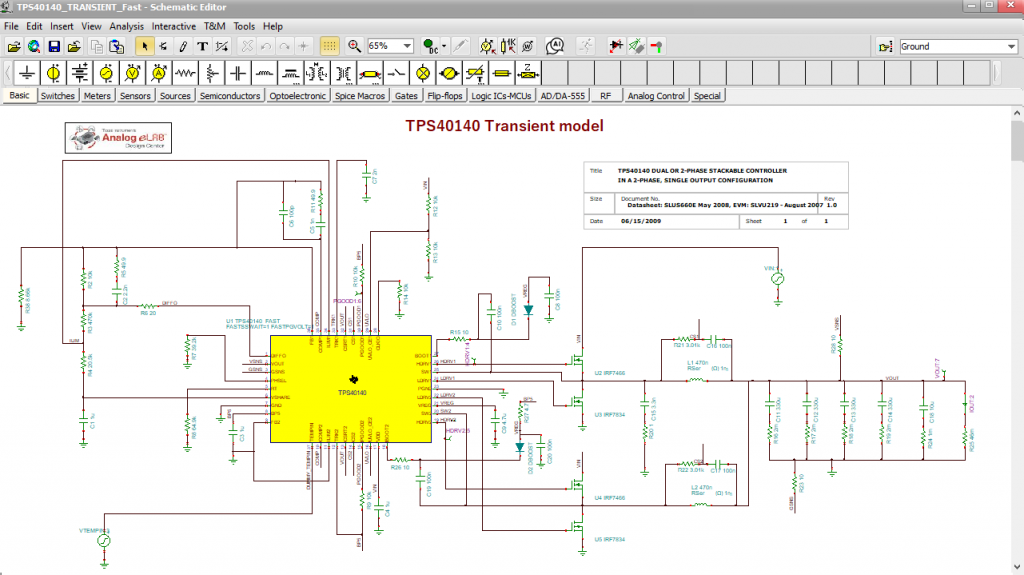
TPS40140 Dual or 2-Phase, Stackable Controller
TPS40140 Transient model
TPS40140 circuit: TINA v15 Transient Analysis runtime statistics
We’ve released a new video tutorial demonstrating how to analyze, design and implement appropriate input and output filtering for an RP506 Series Step-Down DC-DC Converter using TINACloud, and verify the results to ensure stable, low-noise operation.
DC-DC converters are indispensable in modern electronic systems for efficiently stepping voltages up or down. However, their inherent switching operation introduces conducted noise and ripple on both the input and output rails.
Although usually small in amplitude, these disturbances can become critical in sensitive applications such as precision measurement, RF front-ends, or high-speed digital circuits.
We will use the RP506K001C_#Steady.tsc file from the TINA Examples\ Nisshinbo folder.
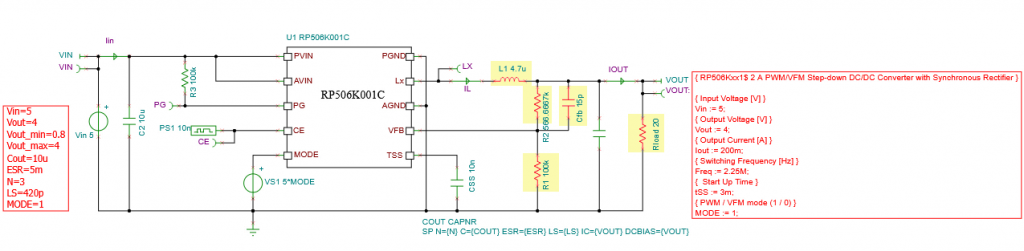
First we will redesign the circuit using the Design Tool in TINACloud to obtain Vout = 4 V. The results of the quick analytic calculation appear instantly:
RP506K001C_#Steady.tsc: Redesigning the circuit using the Design Tool of TINACloud
After closing this window, the resulting circuit with the changed components is displayed.
RP506K001C_#Steady.tsc: Redesigned circuit with the changed components in red
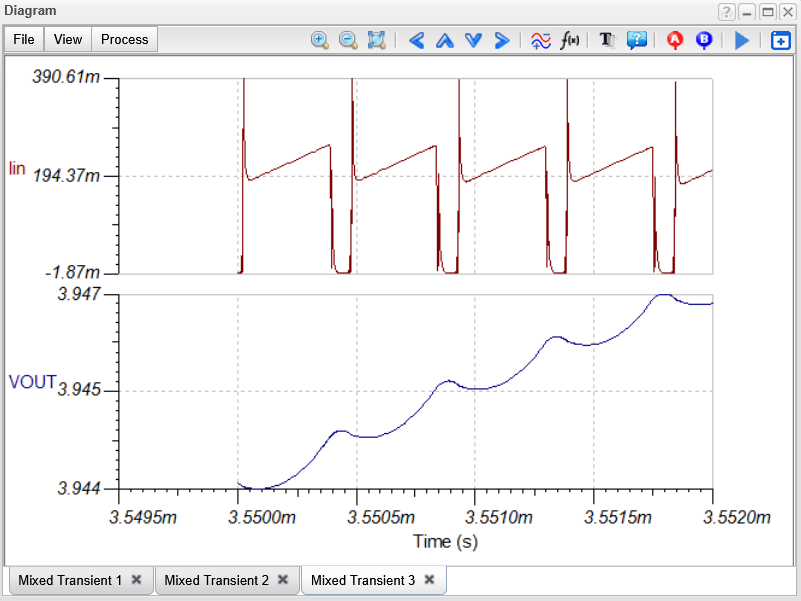
Next, calculate the ripple in the input current (Iin) and output voltage (Vout). Run Transient Analysis. The steady state waveforms appear:
RP506K001C_#Steady.tsc: Steady state waveforms
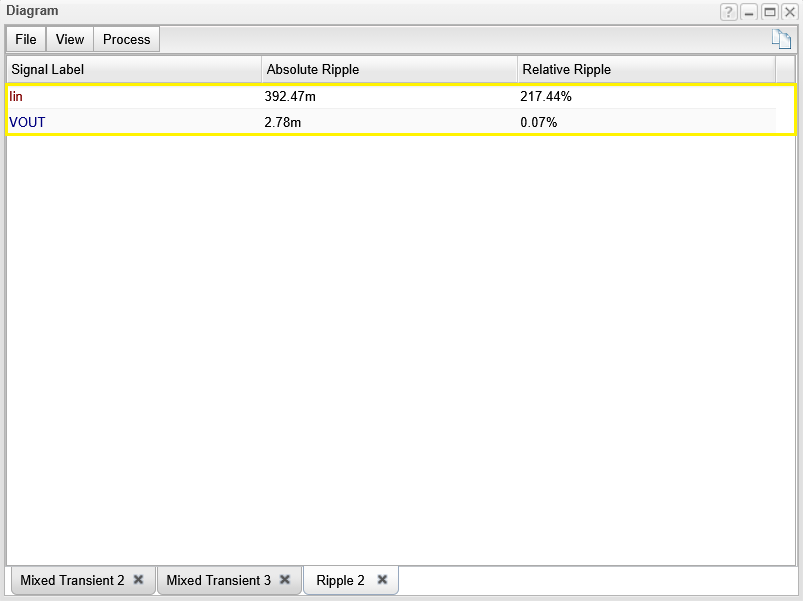
Select Ripple… from the Process menu of the Diagram window to calculate the absolute and relative ripple of Vout and Iin.
RP506K001C_#Steady.tsc: Absolute and relative ripple values
As we can see, the ripple of the output voltage is quite small – only 2.78 mV, while the ripple in the input current is very high but may be acceptable due to the filtering in the main power supply. However, as mentioned in the introduction, these disturbances may cause problems in some applications and therefore must be filtered out.
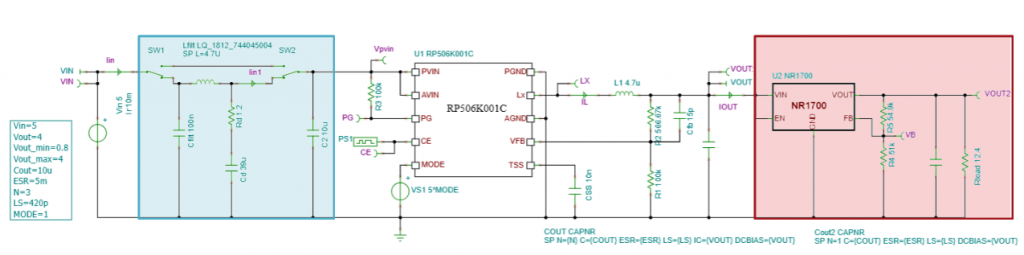
To further filter the output voltage, a common solution is to add an LDO regulator, as it also acts as a low-pass filter that attenuates high-frequency components. The result is a cleaner, more stable output voltage – which is especially important for sensitive analog or RF circuits, microcontrollers, or precision sensors.
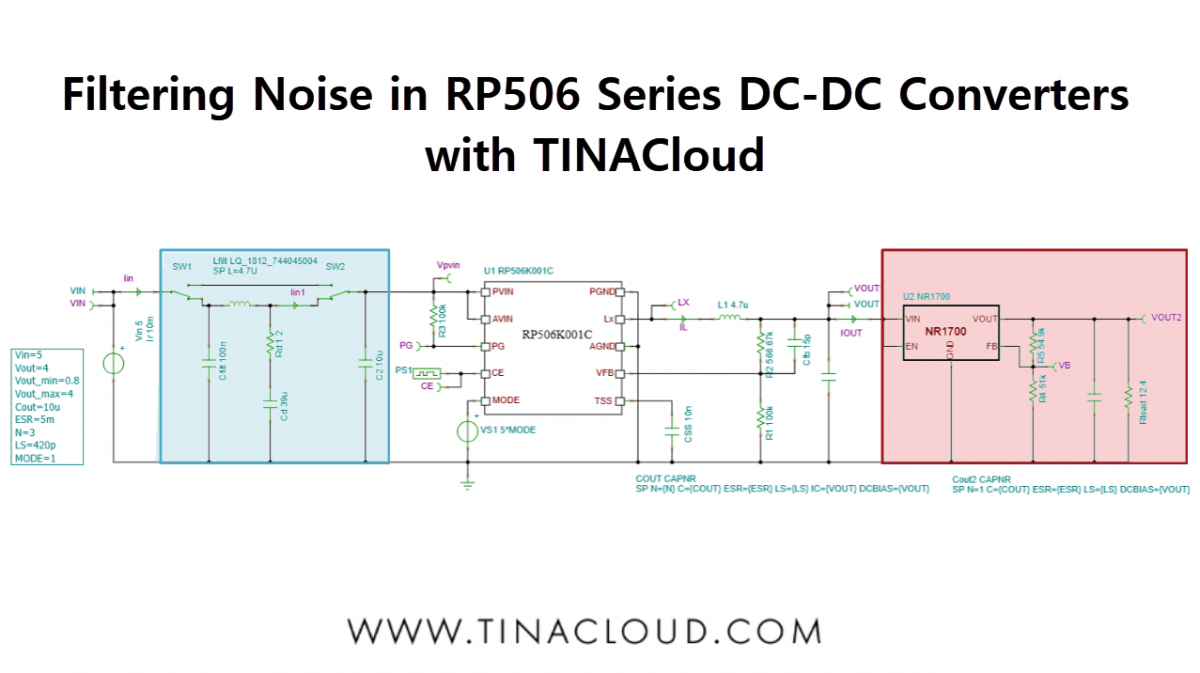
Let’s add an NR1700 Adjustable Output LDO Regulator to the output (available in TINA), and an RLC filter to the input. We get the following circuit:
RP506K001C_#Steady_LDO_CL_Topology.tsc: Adding an NR1700 LDO Regulator to the output and an RLC filter to the input
Now, calculate the transient waveforms and the ripple of this circuit. Using transient analysis, we obtain the following waveforms:
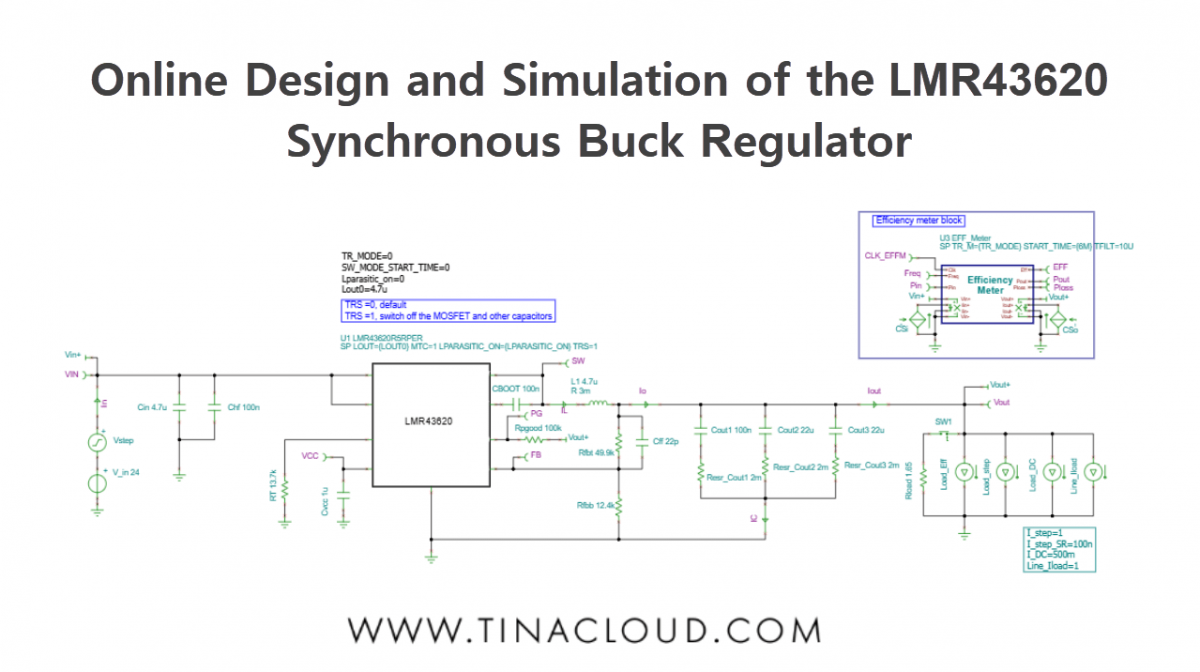
We’ve created a new video tutorial that explores how to quickly and accurately design and simulate power management circuits with TINACloud, this time using the LMR43620 Synchronous Buck Regulator as an example. You can also use the offline TINA program for analyzing this circuit.
The datasheet of this device can be found on the Texas Instruments website, and was used to create the SPICE model for TINA and TINACloud by DesignSoft. This model runs not only in TINA and TINACloud, but also in major SPICE programs including PSpice, SIMetrix, LTspice, and more.
We will cover the following topics:
Startup TransientAnalysis
Steady State Analysis
Line Step Analysis
Load Step Analysis
AC Analysis
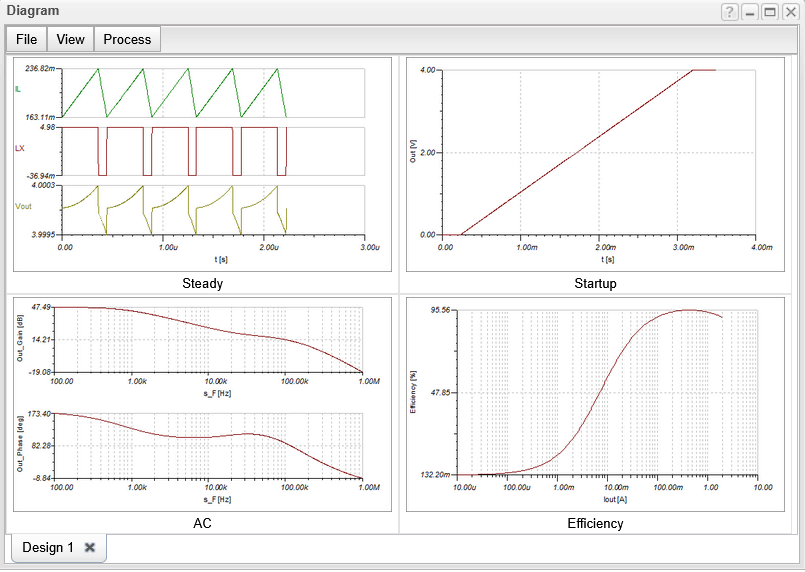
Efficiency Analysis
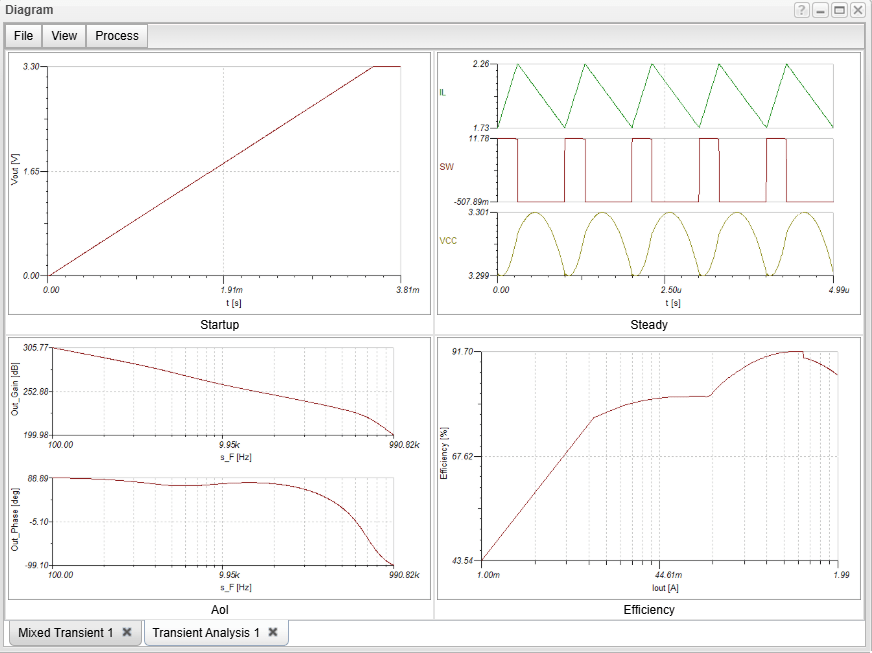
1. Startup Transient Simulation
The startup transient of a DC-DC converter is the period of time during which the converter is transitioning from its off state to its steady-state operating condition. In most simulators the Startup Transient simulation takes a long time since the whole process from the initial state to steady state is simulated.
However due to the built in average model in TINA and TINACloud the simulation takes only seconds both online and offline.
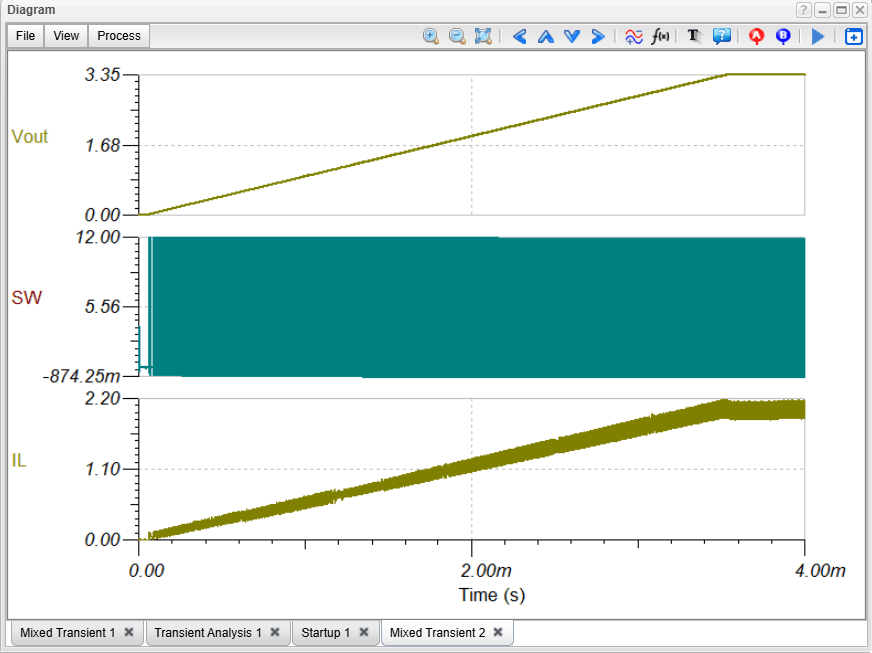
TINA and TINACloud can also be used to perform switching mode transient analysis. Due to the advanced multicore solvers in both software, switching mode transient analysis is still quite fast and results in more detailed waveforms.
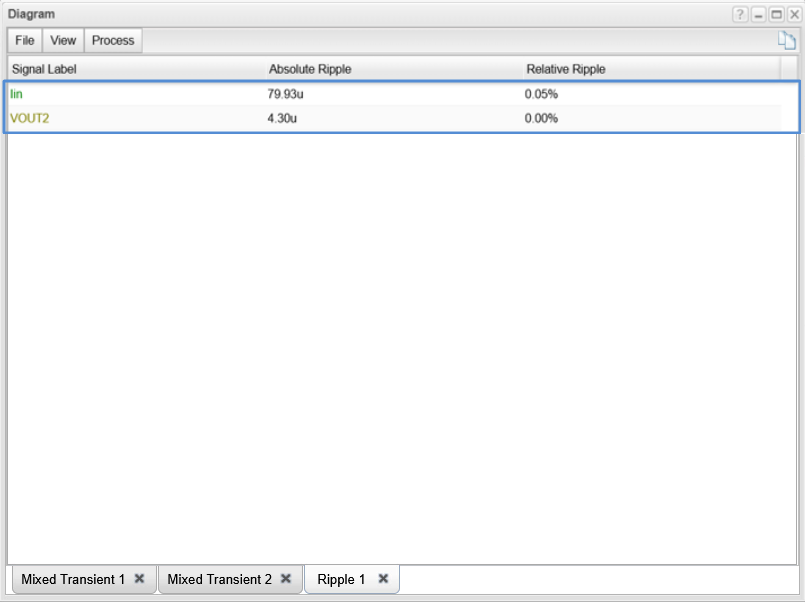
In addition, TINA and TINACloud include a very fast calculation of the ripple voltages using the combination of the average and switching models.
Let’s load the LMR43620 Multiple Simulations.TSC circuit from the TINA Examples folder.
This circuit allows you to run all the necessary simulations for characterizing the LMR43620 from the same file, but separate circuit files for each simulation are also included in the folder.
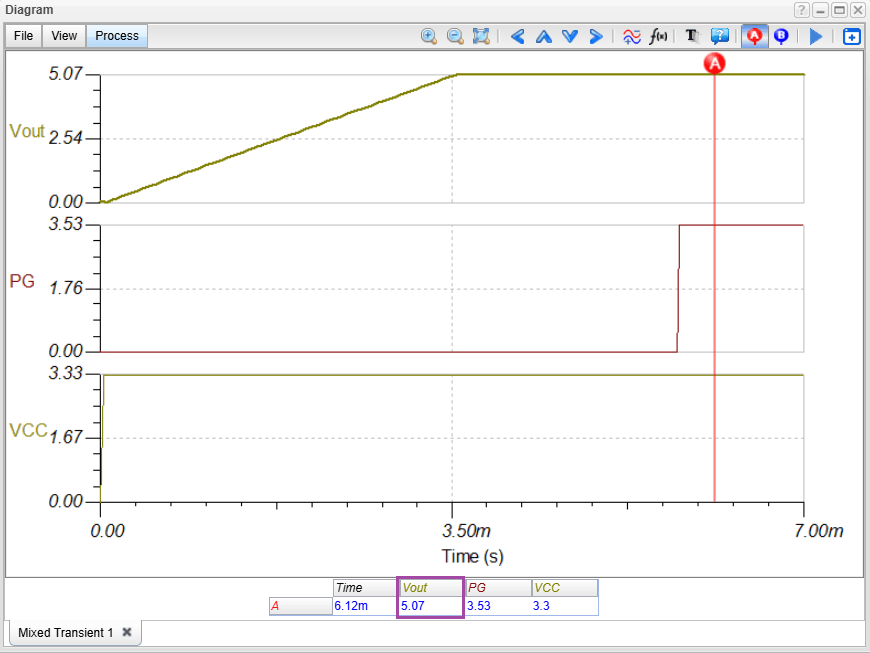
For running Transient Analysis, click the Transient Analysis Fast link or select Transient… from the Analysis menu. Note that by default the Use switching model checkbox is not checked. This means that the fast average model is used.
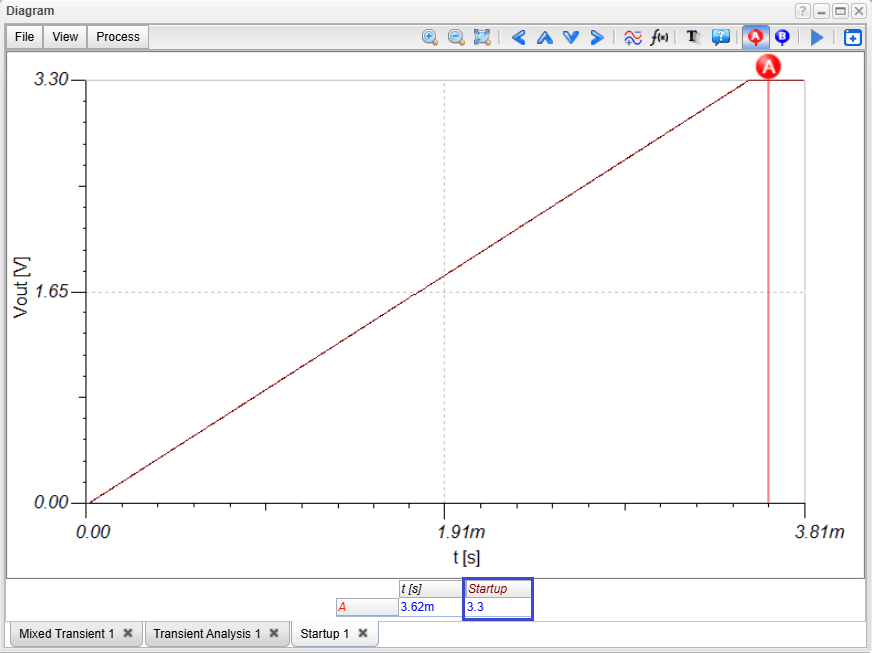
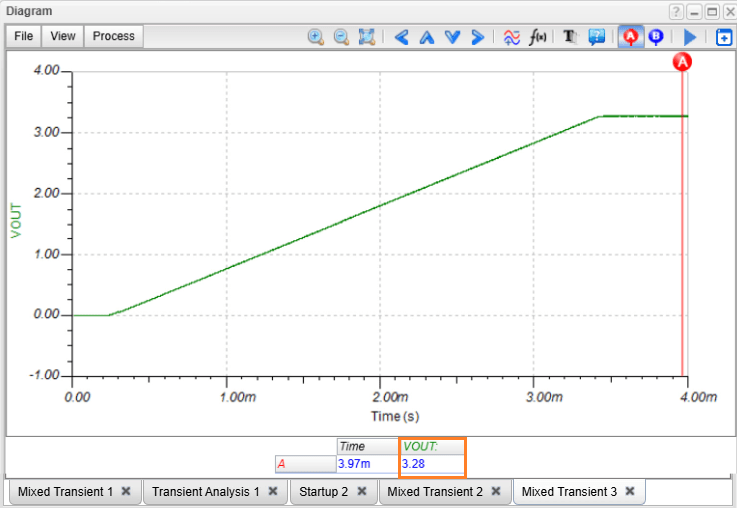
By pressing the Run button, the time function of Startup Transient appears within a few seconds. If you click on the top-right of the Startup diagram and run a cursor on it, you can check that the output voltage is approx. 5 V.
LMR43620 circuit: Startup Transient Fast analysis
Redesigning the circuit
TINA and TINACloud’s Design Tool can determine circuit parameters to achieve a predefined target output.
To use the Design Tool select Re-design this circuit from the Tools menu, or double click the text box on the left side of the current circuit. The Design Tool dialog appears. So far the Vout voltage has been 5V. Let’s redesign the circuit to generate a 3.3 V output voltage. To do this, change Vout to 3.3 and press Run. The following screen appears:
Redesigning the circuit using Design Tool
The Design Tool displayed a quick diagram of all the relevant analysis results, based on analytic calculations.
If you click on the top-left of the Startup diagram and run a cursor on it, you can check that the output voltage is now indeed 3.3 V.
LMR43620 circuit: Startup Transient analysis after redesigning the circuit
You can also run a more accurate numerical Transient simulation on the redesigned circuit and see that it provides nearly the same result as the analytic result.
Finally, you can also run the switching model if you click the Transient Analysis Accurate link, or check the “Use switching model” checkbox at the Run Transient Analysis dialog.
Depending on cloud traffic, the simulation in TINACloud may take a few minutes, but the Vout output remains nearly identical to the result from the average method, which completes in seconds. Note, that compared to TINACloud, switching mode simulations typically run much faster in the offline TINA program- especially on high-performance, multi-threaded machines.
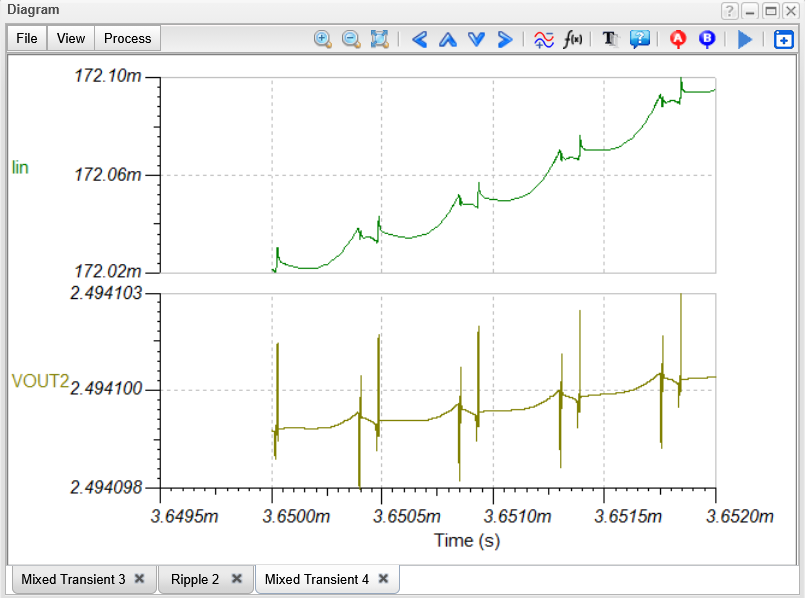
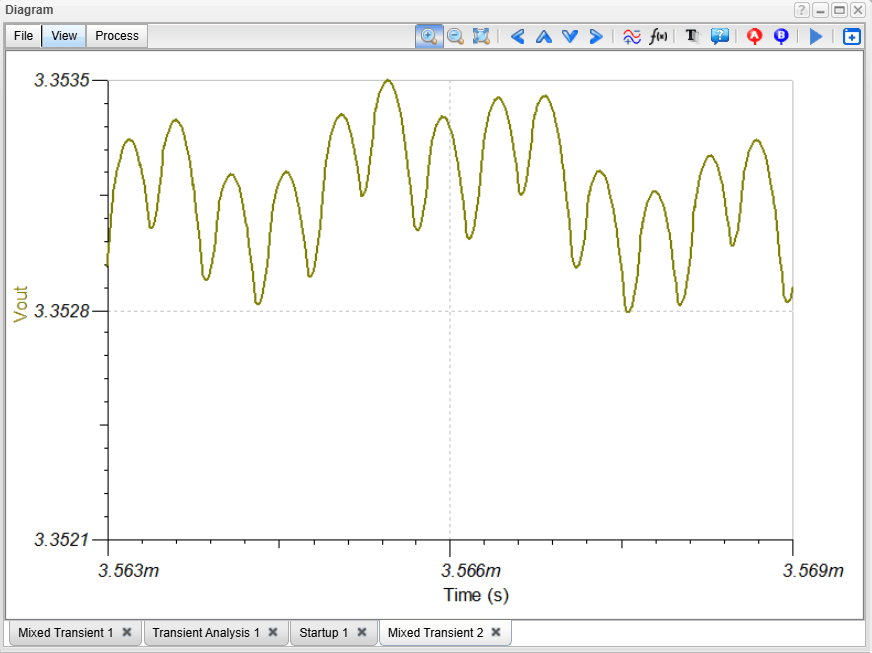
Let’s select the output voltage. The only difference is in the Ripple which is not provided by the average model. If we zoom in, we can see the ripple voltage waveform more clearly.
LMR43620 circuit: Ripple voltages
However, switching mode analysis takes considerable time, and the small ripple voltage makes zooming in quite difficult. To solve this problem, TINA and TINACloud feature a fast and accurate method for the direct calculation of ripple voltages in steady state.
2. Steady State Analysis
Steady state analysis of a DC-DC power supply is the analysis of the circuit’s behavior when it has reached a steady state. This means that the output voltage is constant, except for the ripple voltage, and all the components in the circuit are operating in their steady state conditions. This method allows a very fast determination of ripple voltages for any circuit settings without the need of storing initial values of inductors and capacitors in the circuits. To demonstrate how this method works we will use the same circuit LMR43620 Multiple Simulations.TSC.
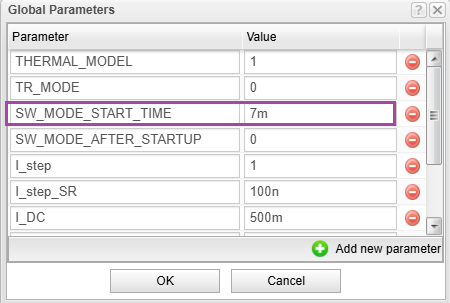
This circuit is identical with the previous circuit, except for some Global Parameter settings. The Global Parameter settings determine the starting time (7ms) of the switching mode transient analysis.
LMR43620 circuit: Global Parameter settings dialog
We will use TINACloud to analyze the circuit and determine the ripple voltage.
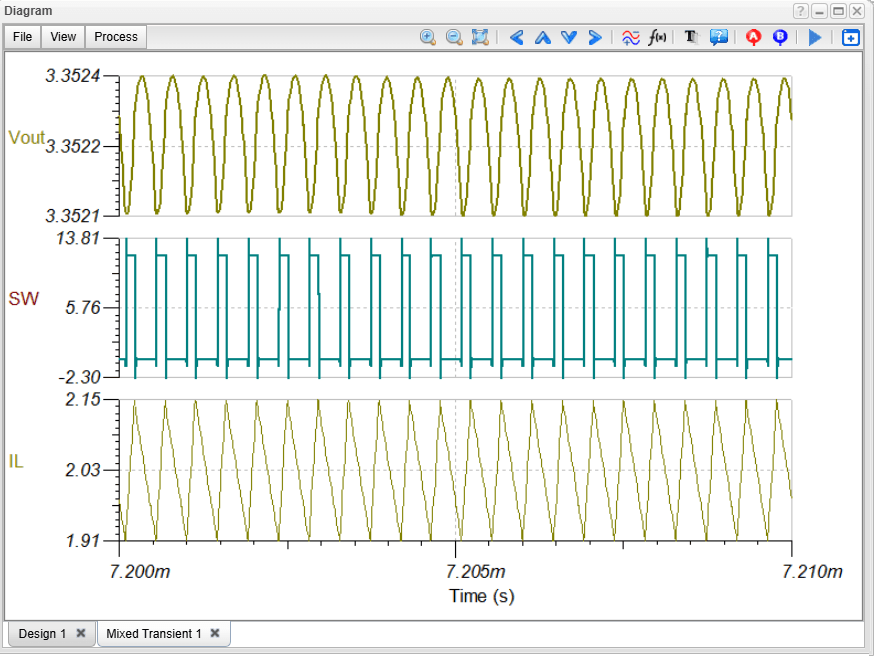
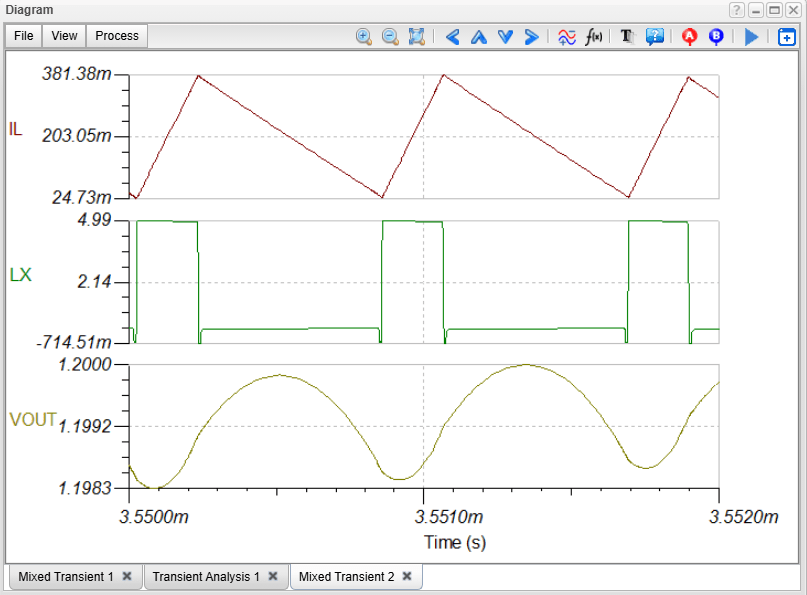
Let’s run Transient analysis. After a short calculation time the ripple voltages and current of the outputs appear in a diagram.
LMR43620 circuit: Steady state analysis
Similarly, you can also quickly simulate Line Stepping and Load Stepping circuit response.
3. Line Stepping Analysis
Line stepping analysis of DC-DC converters is used to determine how a DC-DC converter responds to changes in the input voltage.
TINA and TINACloud can simulate the circuit response extremely fast due to their built-in average models. Line stepping analysis of DC-DC converters is used to determine how a DC-DC converter responds to changes in the input voltage. TINA and TINACloud can simulate the circuit response extremely fast due to their built-in average models.
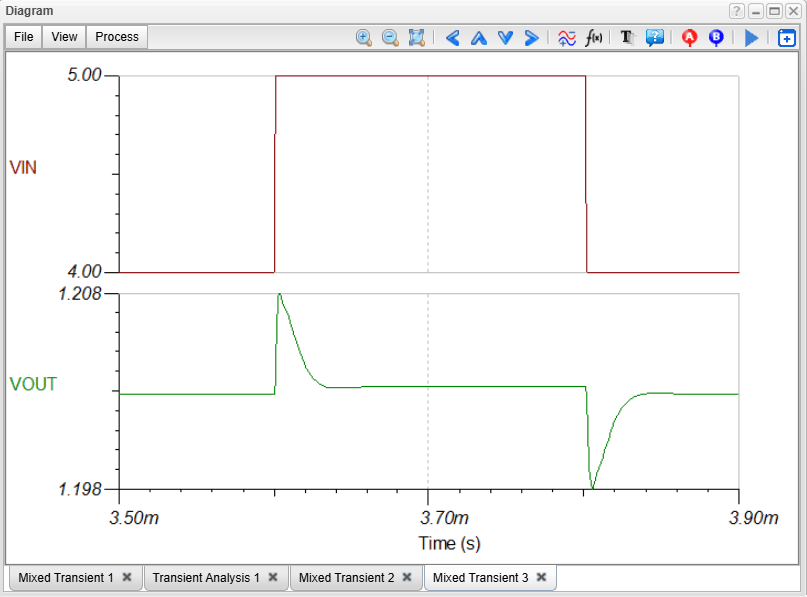
To see how the circuit responds to a step change in the Input Voltage, click on the link “Line Step Analysis Fast”. In a few seconds, the circuit response will appear in a diagram.
LMR43620 circuit: Line stepping fast analysis
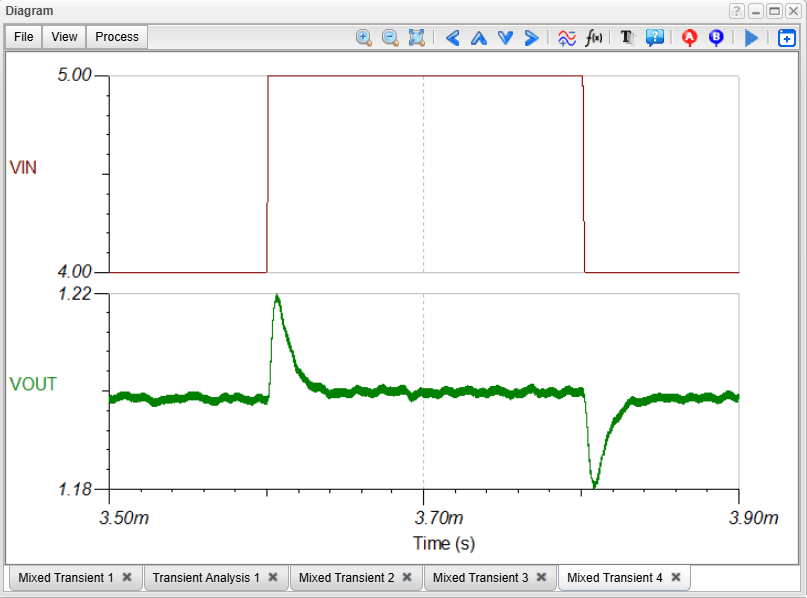
To run the switching model, check the “Use switching model” checkbox in the Run Transient dialog and press run. The full ripple voltage appears:
LMR43620 circuit: Line stepping accurate analysis
4. Load Step Analysis
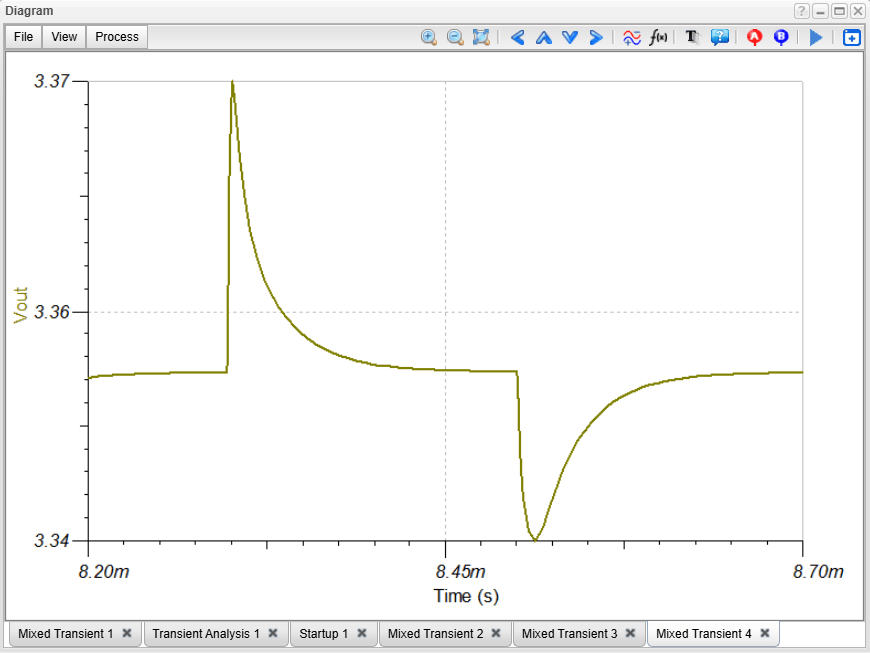
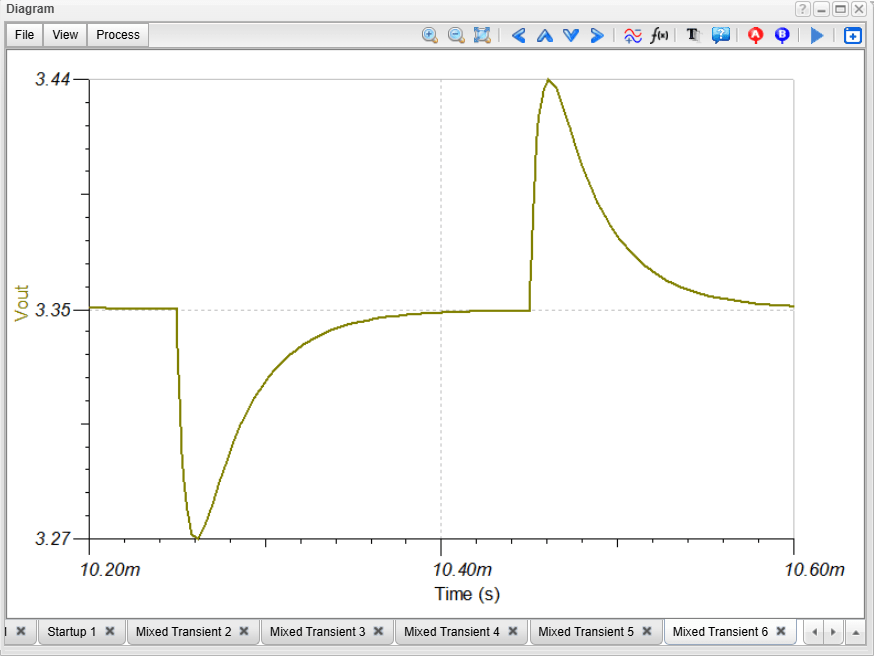
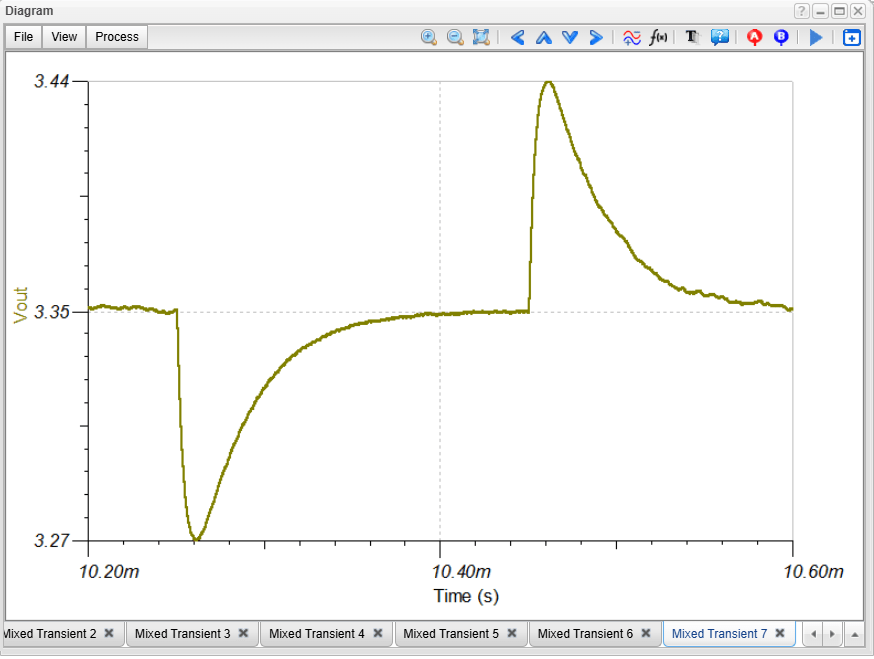
Load step analysis of DC-DC converters is a type of circuit simulation that is used to determine how a DC-DC converter responds to changes in the load current. In TINA and TINACloud you can also quickly simulate the circuit response to a load step.
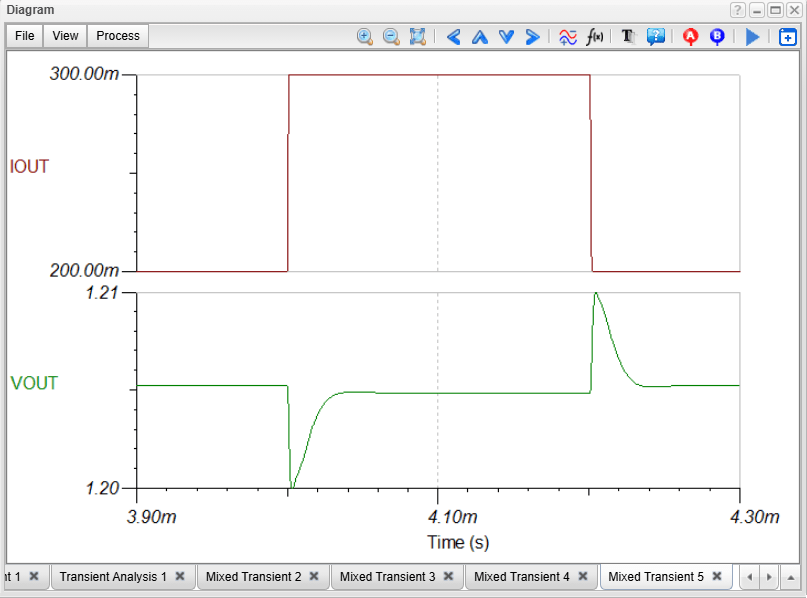
To see how the circuit responds to a step change in the I_step current, click on the link: “Load Step Analysis Fast”. In a few seconds, the circuit response will appear in a diagram.
LMR43620 circuit: Load stepping fast analysis
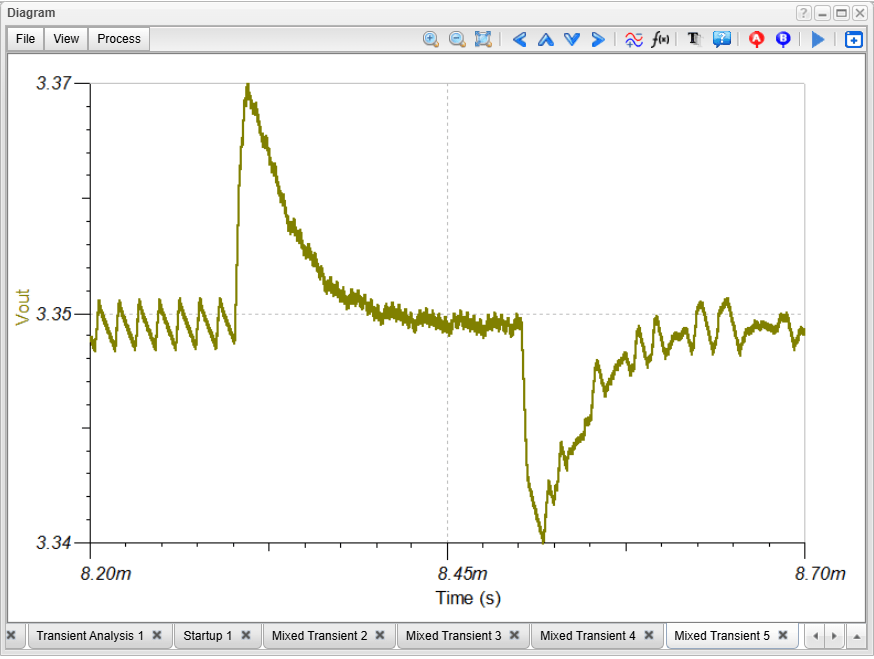
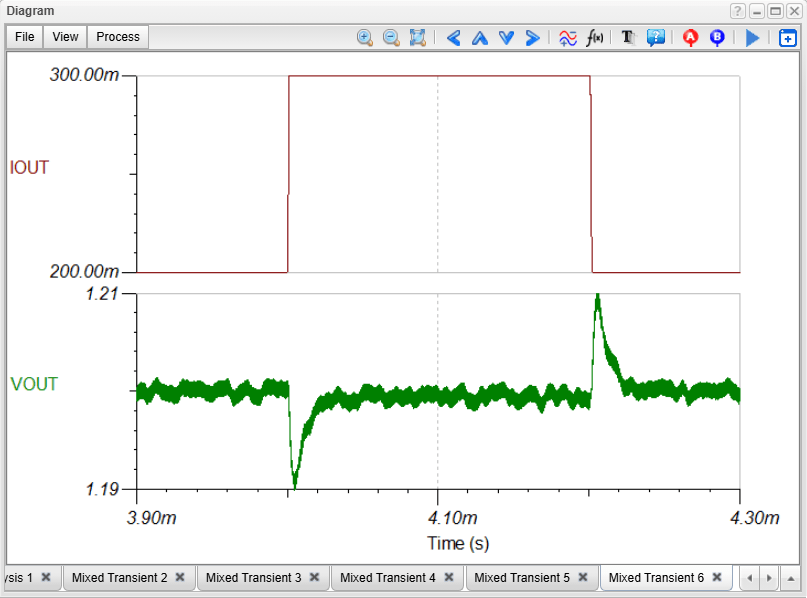
There is also a switching mode version to see the accurate simulation. Check the “Use switching model” checkbox in transient dialog and run the simulation.
LMR43620 circuit: Load stepping accurate analysis
5. AC Analysis
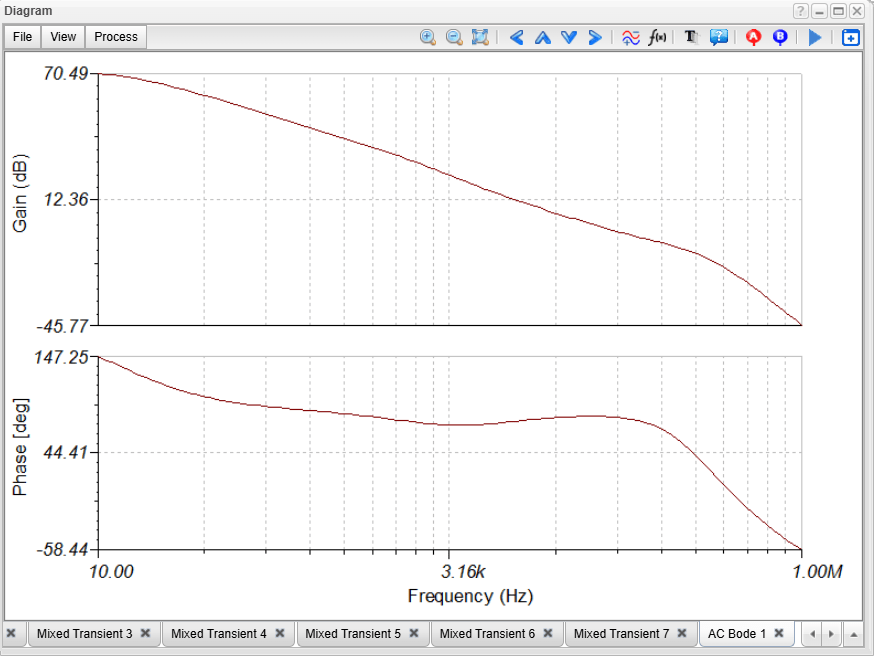
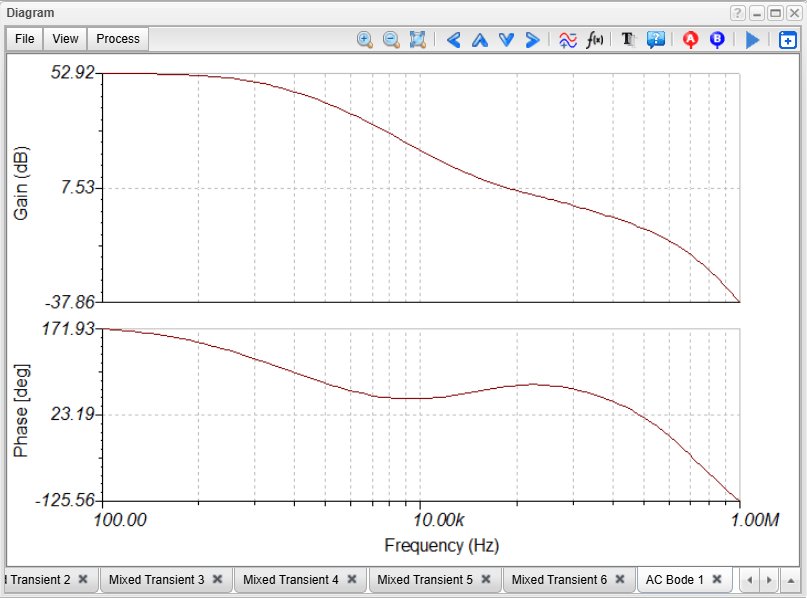
The built-in average models of DC-DC converters in TINA and TINACloud allow fast and accurate AC analysis. Click the AC Transfer Characteristic link or select AC Analysis from the Analysis menu and Run AC Transfer. The AC Bode diagram of the Loop Gain appears.
LMR43620 circuit: AC Bode diagram
6. Efficiency Analysis
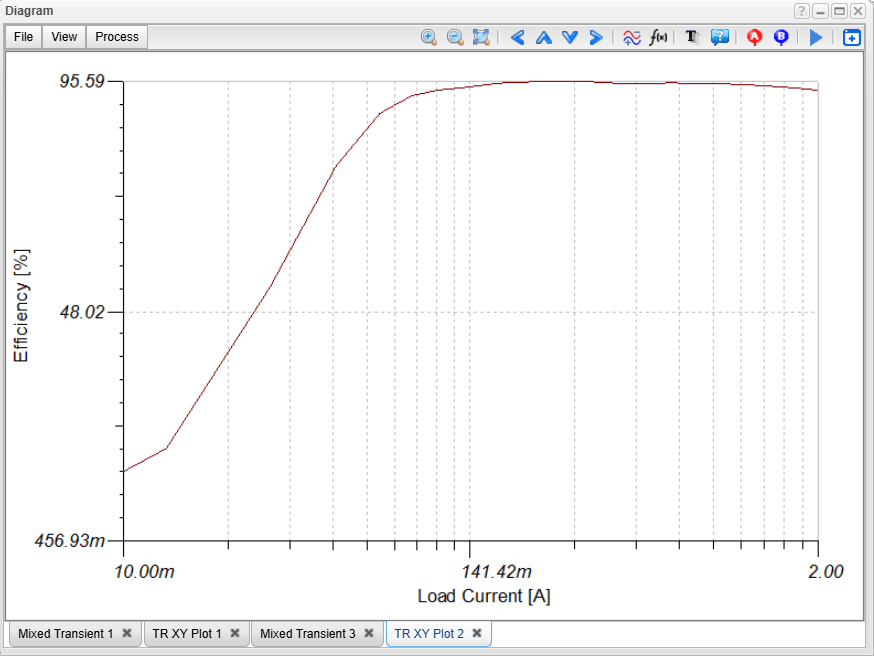
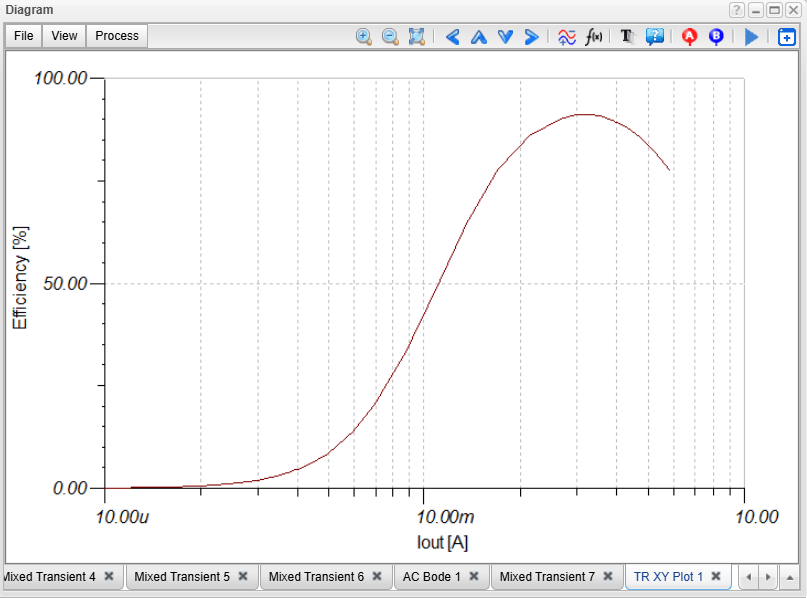
TINA and TINACloud also allow fast and accurate calculation of efficiency as a function of load current.
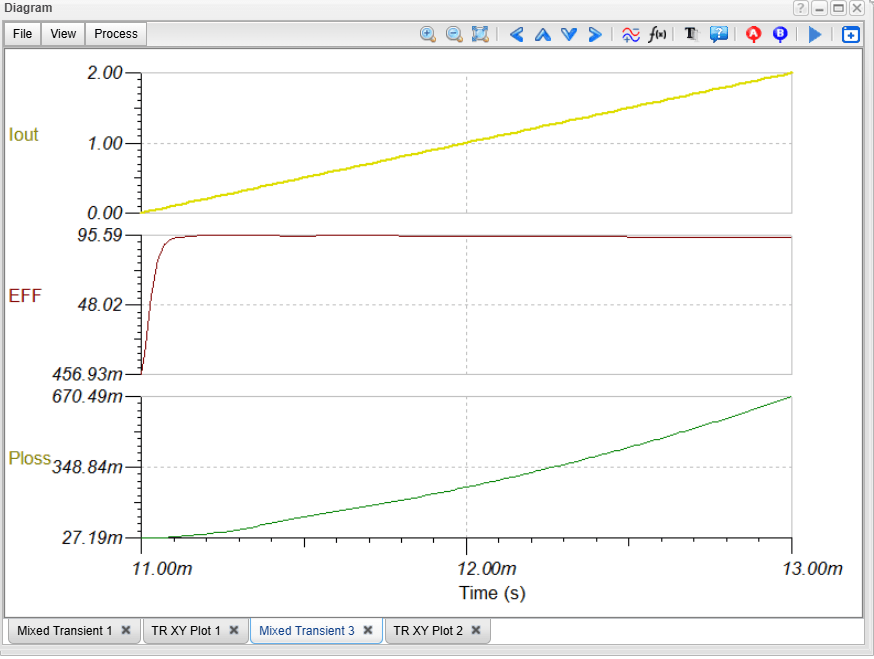
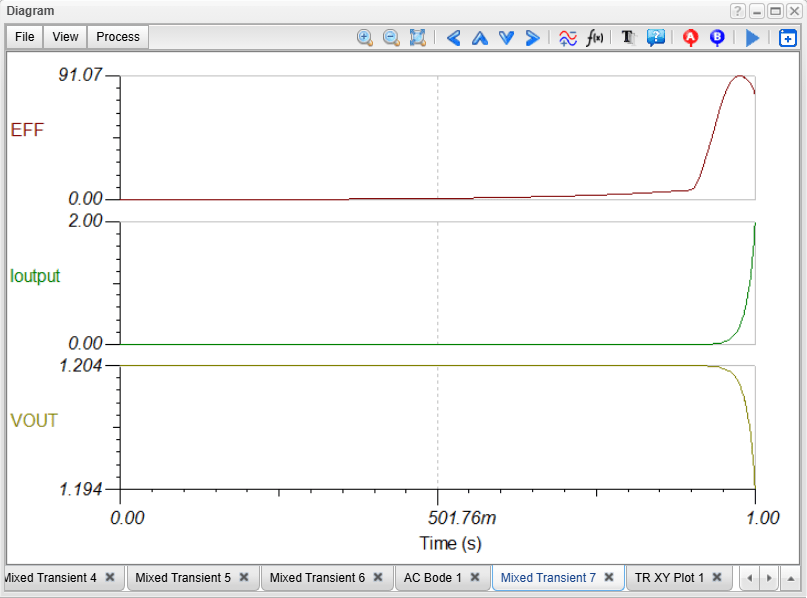
The efficiency as functions of time and load current is calculated using a special time-dependent (Iout) load current. For this calculation a dedicated Efficiency Meter is available on the Meters menu of TINA and TINACloud. Click the link “Efficiency Analysis Fast link, or Run Analysis/Transient…
LMR43620 circuit: Efficiency as a function of time
Click the TR XY Plot Tab. The Efficiency as a function of Output or Load current appears:
LMR43620 circuit: Efficiency as a function of Output or Load current
This concludes the video tutorial on analyzing the key characteristics of the LMR43620 Synchronous Buck Regulator using TINACloud.
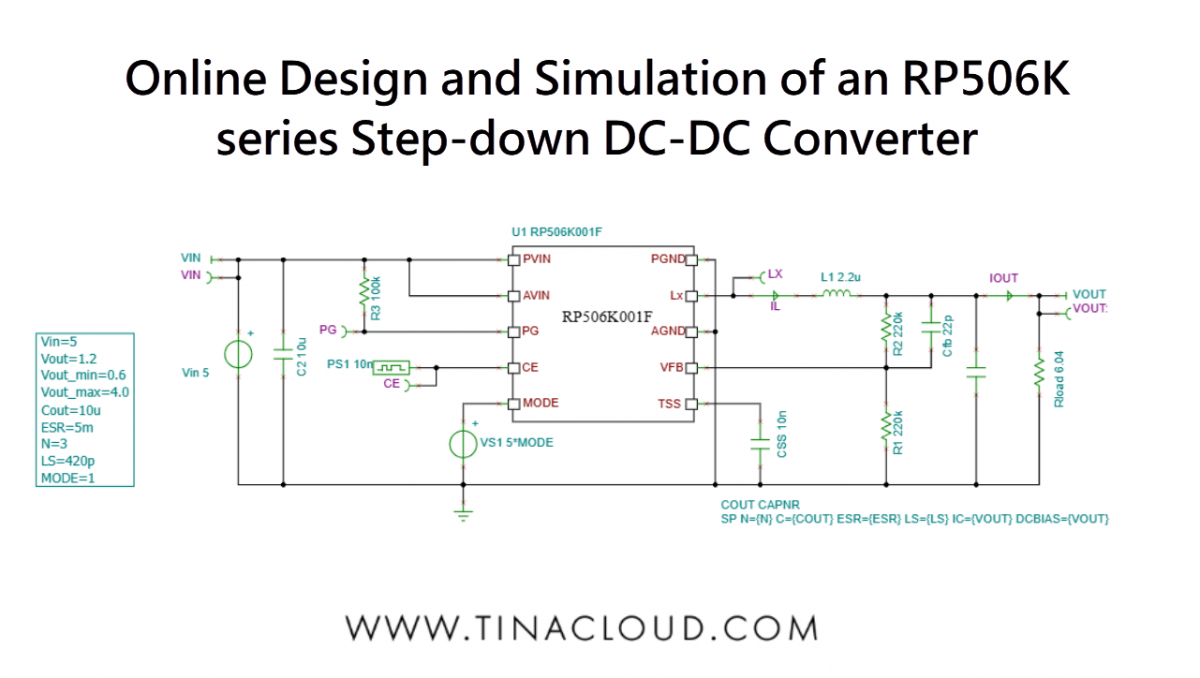
We’ve released a new video tutorial demonstrating the design and simulation of a power management circuit—specifically, the RP506K001F Step-down DC/DC Converter—using TINACloud.
TINA and TINACloud allow fast and accurate simulation and design of power management integrated circuits both offline and online.
The datasheet of this device can be found on the Nisshinbo Micro Devices Inc. website: (https://www.nisshinbo-microdevices.co.jp/en/pdf/datasheet/rp506-ea.pdf) and was used to create the SPICE model for TINA and TINACloud by DesignSoft.
This model runs not only in TINA and TINACloud, but also in major SPICE programs including PSpice, SIMetrix, LTspice, and more.
Startup Transient Simulation
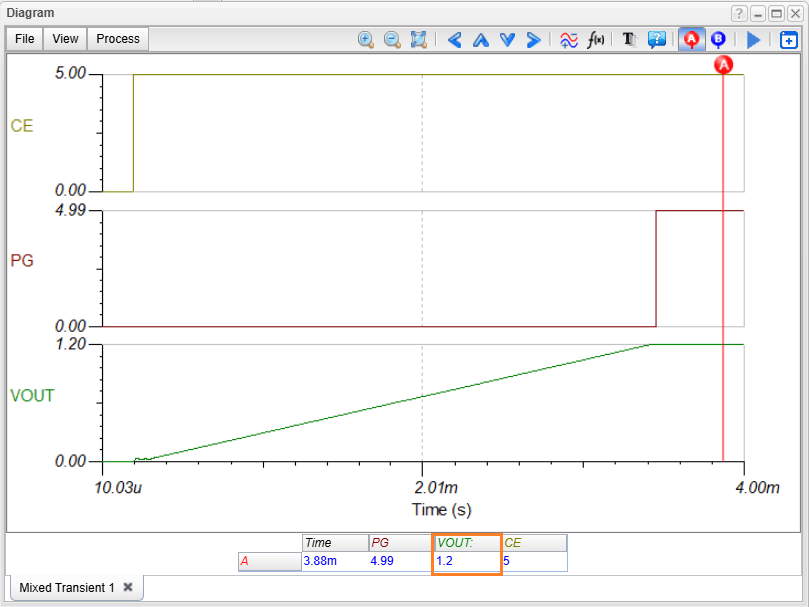
Fast Average Model: In most simulators, this process is slow, but TINA and TINACloud use a built-in average model that completes the simulation in just seconds (online or offline). First load the circuit from the TINA Examples folder. To run the simulation, select Transient… from the Analysis menu, and ensure the Use switching model checkbox is not checked. Pressing Run displays the startup transient time function in a few seconds. Next, we run a cursor on the startup diagram to check that the output voltage is 1.2V.
Switching Mode Analysis: TINA and TINACloud also support the more detailed switching mode transient analysis. Thanks to advanced multicore solvers, this is still fast and provides more detailed waveforms.
RP506K001 Step-down DC/DC Converter circuit: Startup Transient Fast analysis
Redesigning the Circuit
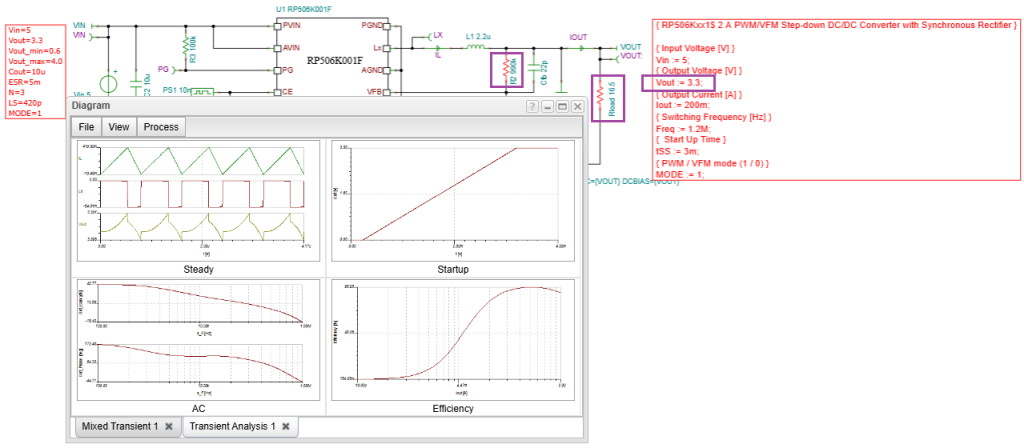
TINA and TINACloud’s Design Tool allows you to quickly determine component values to achieve a target output. Select Re-design this Circuit… from the Tools menu (or double-click the circuit’s text box).
In the Design Tool dialog, change the target output voltage to 3.3V and press Run. The tool instantly provides analytic results, showing the required component changes (highlighted in red) and confirming the new output voltage.
RP506K001 Step-down DC/DC Converter circuit: Redesigning the circuit
You can then run the numerical Transient simulation again to confirm the result, which will be nearly identical.
Running the Switching Model for Accuracy
You can run the most accurate simulation by checking the “Use switching model” checkbox in the Transient Analysis dialog.
This calculation takes minutes (or around 10 minutes in TINACloud, depending on traffic) and the output voltage curve is very similar to the fast average method.
Note: Switching mode simulations typically run much faster in the offline TINA program, especially on powerful, multi-threaded machines.
The only difference this method reveals is the Ripple voltage, which is not provided by the average model.
However, switching mode analysis takes considerable time, and the small ripple voltage makes zooming in quite difficult.
To solve this problem, TINA and TINA Cloud feature a fast and accurate method for the direct calculation of ripple voltages in steady state.
Steady State Analysis and Ripple
Steady state analysis of a DC-DC power supply is the analysis of the circuit’s behavior when it has reached a steady state. This means that the output voltage is constant, except for the ripple voltage, and all the components in the circuit are operating in their steady state conditions.
Fast Ripple Calculation: Standard switching mode analysis is time-consuming, and zooming in to see the small ripple can be difficult. TINA and TINACloud feature a fast and accurate direct calculation of steady-state ripple voltages.
This method uses average models to quickly reach the steady state, then switches to switching models to determine the precise ripple voltage without needing to store initial inductor and capacitor values.
Load the specified circuit (identical to the previous one but with Global Parameter settings to define a starting time for the switching mode analysis) and run Transient Analysis. The ripple voltages and currents will appear in a diagram after a brief calculation.
RP506K001 Step-down DC/DC Converter circuit: Steady state analysis
Line Stepping Analysis
This determines the converter’s response to changes in the input voltage (line step disturbance).
Load the appropriate circuit and run Transient from the Analysis menu. The circuit’s response to the input voltage step appears in a few seconds.
You can also run the switching model (by checking the box) to see the full ripple voltage during the step response.
RP506K001 Step-down DC/DC Converter circuit: Line stepping fast analysis
RP506K001 Step-down DC/DC Converter circuit: Line stepping accurate analysis
Load Step Analysis
This determines the converter’s response to changes in the load current (load step disturbance). Load the corresponding circuit (which includes a load step applied to the output current).
Select Transient from the Analysis menu and click Run. The circuit’s response will appear in a few seconds.
To see the most accurate simulation, check the “Use switching model” checkbox in the transient analysis dialog and run the simulation.
RP506K001 Step-down DC/DC Converter circuit: Load stepping fast analysis
RP506K001 Step-down DC/DC Converter circuit: Load stepping accurate analysis
AC Analysis
The built-in average models enable fast and accurate AC analysis. Load the AC analysis circuit from the TINA Examples folder.
Select AC Analysis from the Analysis menu, then select Run AC Transfer Characteristic… The AC Bode diagram of the Loop Gain will appear.
RP506K001 Step-down DC/DC Converter circuit: AC Bode diagram
Efficiency Analysis
TINA and TINACloud can quickly calculate efficiency as a function of the load current.
Load the specific circuit, which uses a special time-dependent load current and an Efficiency Meter. Run Analysis\Transient…
The efficiency as a function of time is calculated. Click the TR XY Plot Tab to display the Efficiency as a function of the Output (Load) current.
RP506K001 Step-down DC/DC Converter circuit: Efficiency as a function of time.
RP506K001 Step-down DC/DC Converter circuit: Efficiency as a function of Output or Load current
Conclusion
This presentation covered the analysis of all important characteristics of the RP506K001F Step-down DC/DC Converter including:
Startup Transient Simulation (Fast average and detailed switching modes)
Steady State Analysis (Fast ripple voltage calculation)